

Why is my business not showing up on Google?
The five common reasons a business is missing from Google Search and Maps, how to check each one in order, and which fixes you can make today.

On this page8 sections
Google’s help pages (opens in a new tab) point to five common causes: the Business Profile is not verified, its details are incomplete or break Google’s rules, the website is not indexed yet, the business is new, or it shows but ranks below competitors. Each has a different fix, so check them in order.
You searched for your business, or for the service you sell in your town, and you were not there. This guide puts the checks in the order that saves you time. You can do most of them yourself today, and the rest go on a short list for your developer.
The short answer
Google shows your business in two places, and each has its own causes. Your Business Profile is the listing with the map, the phone number and the hours. Your website is the page that comes up as a link under the search box.
A profile that is missing usually has a problem with verification, its details or Google’s rules. A website that is missing is usually new, blocked from Google or moved without its old addresses pointing to the new ones. And sometimes nothing is missing at all: you show up, but below other businesses.
The order matters because each check depends on the one before it. Correcting your hours does nothing for a profile Google will not show. Writing a better service page does nothing while a setting on the site tells Google to stay out.
First, check whether you are missing at all
Start by confirming that you are missing. Google’s own Search Console help says that “many people assume that they are not on Google, when in fact their page simply appears low in Search results,” or is left out because of the way they searched (Google (opens in a new tab)).
These four searches tell you which part of this guide you need.
- Search your name and town. On Google Search, then on Google Maps, type your business name and your city, the way Google suggests (opens in a new tab). If your profile appears for your name, it exists and Google shows it.
- Search from another device. Use a phone or computer that is not signed in to your Google Account, or ask a friend in another town. Google’s local results depend partly on how far the person searching is (opens in a new tab) from each business, so one search from your own desk does not tell the whole story.
- Search for your website. Type
site:followed by your web address, for examplesite:yourbusiness.example, into Google Search. Google uses this search to confirm a site is in its index (opens in a new tab). Turn off SafeSearch first, since Google notes it can filter results. - Search for what you sell. Type the service and the town, the way a new customer would. This is the search that brings in calls.
The results sort you into one of three groups. If your name finds nothing on Maps, go to the Maps section below. If the site: search finds nothing, go to the website section. If your name finds you but the service search does not, you are on Google and being outranked, which has its own section.
If you have a Search Console account for your website, its URL Inspection tool tells you whether a given page is in Google’s index. Google says indexing problems are “much easier to diagnose” with Search Console (Google (opens in a new tab)).
Why is my business not visible to customers?
A business is usually invisible on Google for one of five reasons. The first is an unverified Business Profile: Google says only verified businesses can show their business info on Maps and Search. The second is a profile with missing or wrong details, such as no category, old hours, or a name and phone number that differ from the website. The third is a profile that breaks Google’s guidelines, for example a business name stuffed with keywords or an address at a virtual office; Google disables or suspends those profiles until the issue is fixed. The fourth is a website Google has not indexed, because it is new, blocked by a setting such as noindex, or moved without 301 redirects. The fifth is time and competition: Google says rankings for a new business can take up to a month to appear, and after that, local results mainly depend on relevance, distance and how well known the business is. Check the five in that order, because each fix only helps once the one before it is in place.
Why is my business not showing up on Google Maps?
A business is missing from Google Maps most often because its Business Profile is not verified, is incomplete, or breaks one of Google’s rules. Each of these is something you can check yourself in your Business Profile, signed in to the Google Account that manages it.
How do I get a business to show up on Google?
You get a business to show up on Google by creating or claiming its Business Profile and verifying it. Google is direct about this: “Only verified businesses can show their business info on Maps and Search” (Google (opens in a new tab)).
Verification tells Google that you are authorized to represent the business, which Google says makes the profile more likely to show up in search results (Google (opens in a new tab)). If you started a profile and never finished the verification step, that alone can explain why you are missing.
Access can also get in the way. To find and manage your profile, you have to sign in to the Google Account associated with it (Google (opens in a new tab)). If a former employee, a relative or an old agency set it up, find out whose account it is before you create a second profile. Google’s guidelines say there should only be one profile per business (Google (opens in a new tab)), and its help center has a separate guide for requesting ownership of a profile someone else controls.
Does it cost money to have your business listed on Google?
No, a Business Profile costs nothing. Google’s own page says: “Yes, creating a Business Profile and listing your business on Google is free” (Google (opens in a new tab)).
Paying Google does not move you up either. Google’s Search documentation says it “doesn’t accept payment to crawl a site more frequently, or rank it higher” (Google (opens in a new tab)), and its local ranking page says “there’s no way to request or pay for a better local ranking on Google” (Google (opens in a new tab)).
Ads on Google are a separate, paid product, and buying them does not raise your free listing: Google says it “doesn’t accept payment to rank pages higher” (Google (opens in a new tab)). If anyone offers to sell you a guaranteed spot on the map, Google’s own words on paid ranking are blunt: “If anyone tells you otherwise, they’re wrong” (Google (opens in a new tab)).
Your details are incomplete or do not match your website
A verified profile can still be left out of searches if its details are thin or wrong. Google says businesses with complete and accurate info are more likely to show up in local search results, and if your info is not accurate, your profile “might not show up for relevant searches in your area” (Google (opens in a new tab)).
Go through these six details, and compare each one with your website and any other listings you have, such as directories or your social pages. A customer who sees one phone number on the map and another on your site has a reason to doubt both.
| Detail | What to check | Google's rule |
|---|---|---|
| Name | The same name on the profile, the website and your sign | Your real-world name, as used on your storefront, website and stationery (Google (opens in a new tab)) |
| Category | The most specific category for your main service | As few categories as possible, never used as keywords (Google (opens in a new tab)) |
| Phone | One number that reaches your business, the same everywhere | A number under the business's direct control; a local number where possible (Google (opens in a new tab)) |
| Hours | Your regular customer-facing hours, plus holiday hours | Regular hours of operation; businesses that work only by appointment should not list hours (Google (opens in a new tab)) |
| Service area | The towns or ZIP codes you serve, not a circle on a map | Up to 20 areas, about 2 hours of driving at most from your base (Google (opens in a new tab)) |
| Website link | A working link to your own site, ideally the page for that location | A website that represents your business location, not a page that sends people elsewhere (Google (opens in a new tab)) |
The category deserves extra care. Google asks for the most specific category that describes your main business, and says it can also detect category information from your website and from mentions of your business across the web (Google (opens in a new tab)). If you are a plumber, choose the plumbing category over a broad one such as general contractor.
Where did my business go on Google?
A profile that was showing and then disappeared has often broken one of Google’s guidelines. Google says that if a profile violates its guidelines, “it becomes disabled or suspended and won’t show to other users on Google until you resolve the issue,” and that you get a notification in the Google Account that manages the profile (Google (opens in a new tab)).
These are the rules a small business can break without meaning to:
- Extra words in the business name. Google says “including unnecessary information in your business name isn’t permitted, and could result in the suspension of your Business Profile.” Its examples of what not to add include marketing taglines, phone numbers, web addresses and phrases such as “Open 24 hours” (Google (opens in a new tab)).
- A virtual office. “If your business rents a physical mailing address but doesn’t operate out of that location, also known as a virtual office, that location isn’t eligible for a Business Profile.” P.O. boxes are not accepted either (Google (opens in a new tab)).
- An address shown where you do not serve customers. Plumbers, cleaning services and other businesses that visit customers are what Google calls service-area businesses. Google’s instruction is plain: “If you don’t serve customers at your business address, remove your address from your Business Profile” (Google (opens in a new tab)).
- More than one profile. Google allows one profile per business, and one service-area profile for a business that travels to customers (Google (opens in a new tab)). A second profile made to win more searches is a problem, and so is an old duplicate nobody remembers creating.
If your profile vanished right after you changed something, wait before you change it again. Google says changes can take up to 3 days to appear (Google (opens in a new tab)).
How long does it take for my business to show up on Google Search?
Google gives its own times. “Rankings for new businesses can take up to a month to appear in search results,” and edits to an existing profile can take up to 3 days (Google (opens in a new tab)). Service-area edits, if approved, may take up to 48 hours to show (Google (opens in a new tab)).
A new web page has its own clock, covered in the website section below. If your business opened last week, the most useful thing you can do is make sure the profile is verified and complete, then give it the time Google states.
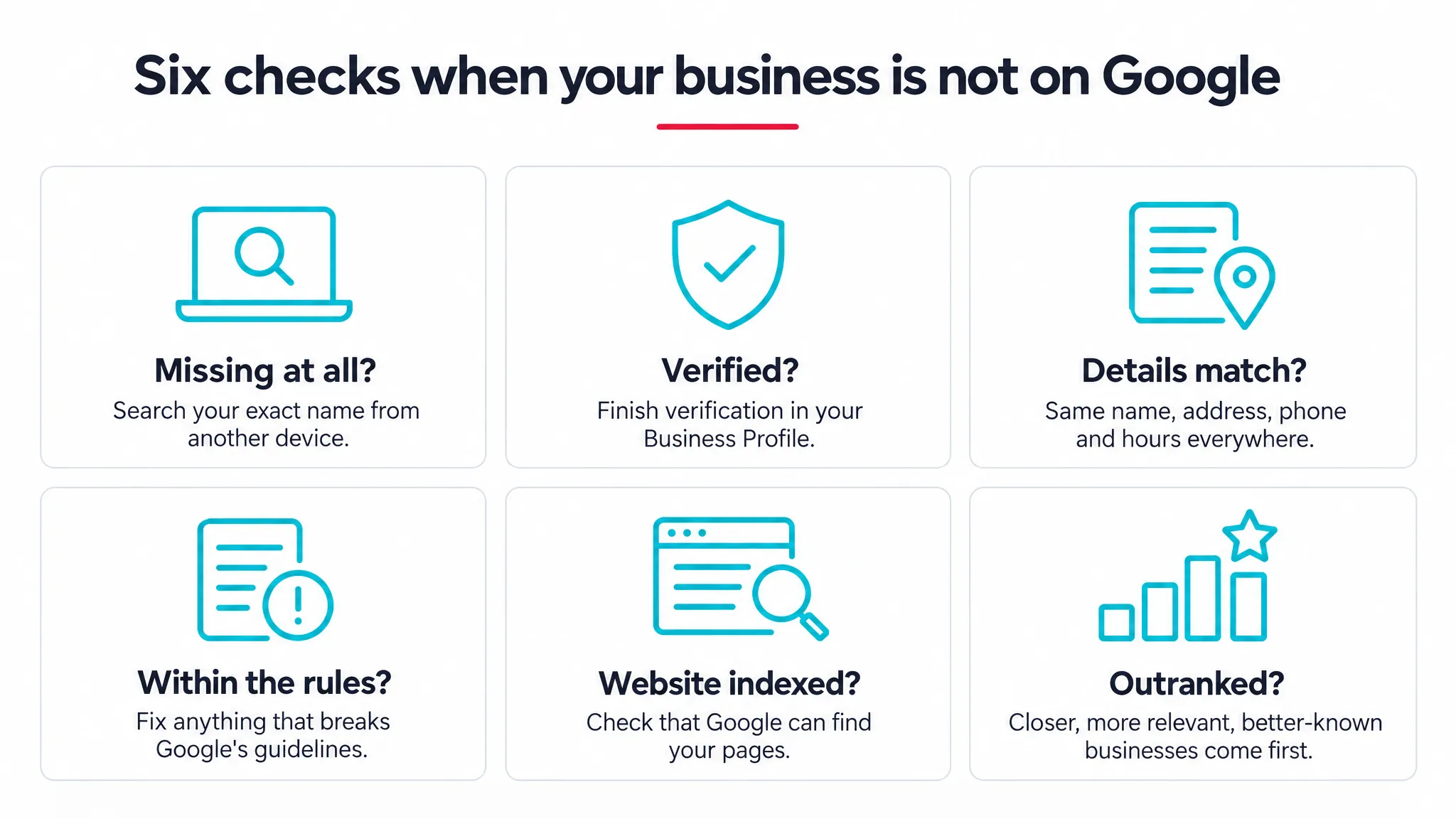
| Check | Where to look | What fixes it | Who usually fixes it |
|---|---|---|---|
| 1. Missing at all? | Search your name and town on Search and Maps, from another device | Nothing, if you appear: go to check 6 | You |
| 2. Verified? | Your Business Profile, signed in to the account that owns it | Finish verification, or get access to the account | You |
| 3. Details complete and matching? | Profile, website and other listings side by side | The same name, category, phone, hours, service area and link everywhere | You for the profile; your developer for the website |
| 4. Within Google's rules? | Your Google Account notifications; the profile name and address | Remove extra words, a virtual office or an address you do not serve from | You |
| 5. Website indexed? | A site: search and Search Console | Remove blocks, add redirects, submit a sitemap, request indexing | Your developer |
| 6. Outranked? | A search for your service and town | A page for each service, complete details, genuine reviews | You, your developer or an SEO team |
Why is my website not showing up on Google?
A website is usually missing from Google because it is new and not indexed yet, because something on the site blocks Google, or because it moved and the old addresses were not redirected. Your Business Profile and your website are separate, so one can show while the other does not.
Why isn’t my new website showing up on Google?
A new website takes time to appear. Google says that after you publish a new page, the total time to crawl and index it “can be anywhere from a day or two to a few weeks, typically,” and asks you to “allow at least a week after submitting a sitemap or a submit to index request before assuming a problem” (Google (opens in a new tab)).
Google does not promise to index every page. Its documentation says it “doesn’t guarantee that it will crawl, index, or serve your page,” even when the page follows its rules (Google (opens in a new tab)). You can make the site easier to find. Google says it discovers new sites from existing sites, so a link from your Business Profile and from your other listings gives it a path in (Google (opens in a new tab)).
Why is Google not crawling my website?
Google cannot add a page it has been told to stay away from. The most common reasons Google lists are “a robots.txt file, a noindex directive, or some other mechanism, such as password protection” (Google (opens in a new tab)). Each of these is a setting on your site, and your developer can find and remove it.
If your site was built behind a password, or with a setting that kept search engines out while it was unfinished, ask your developer to confirm that both were removed when it went live.
A move is the other big cause. Google says that if you restructured your site, moved to a new domain or moved to https, pages that did well before “may now rank poorly if mistakes were made,” and the fix is to “use 301 redirects” from each old address to its new one (Google (opens in a new tab)). Our guide to what a website costs explains how to plan those redirects in a redesign, and our ecommerce website cost guide covers moving a store without losing its links.
Two more cases apply if you bought the domain or the site from someone else. Google says a purchased site can carry manual actions from its past owner, and both manual actions and security issues show in their own reports in Search Console (Google (opens in a new tab)).
How do I get my website to show up on Google?
You help Google find your website by telling it which pages exist and making every page reachable. These steps come from Google’s own troubleshooting page (Google (opens in a new tab)):
- Set up Search Console for your site. Google’s instructions for missing pages assume you have it, because it makes indexing problems far easier to diagnose.
- Submit a sitemap, the file that tells Google which pages you want crawled. Many hosting services create and submit one for you; your developer will know.
- Inspect your important pages with the URL Inspection tool. If a page is not indexed and nothing blocks it, request indexing from the same screen.
- Link every page from your site. Google asks that you can reach any page by following links from your homepage. A page that only exists in an ad or an email is hard for Google to find.
- Use plain page addresses. Google notes that
yourbusiness.example/petstore/zebrais easier to crawl thanyourbusiness.example?page=1234.
Then give each service its own page. Picture an accountant whose homepage mentions bookkeeping, payroll and tax preparation in one paragraph. A customer looking for payroll help still needs a page that says what is included and how to get started. We use the same example on our SEO page, because the fix is a page your customers can use.
You show up, but below other businesses
If your name finds you but your service does not, Google is ranking other businesses first. Google says local results “are mainly based on relevance, distance, and popularity” (Google (opens in a new tab)), and its help page names the third factor prominence, meaning how well known a business is.
Relevance is how well your profile matches the search. Google’s advice here is to provide complete and detailed business info, which is the work of the Maps section above. Your website adds to it: a page that explains each service gives Google, and the customer, more to match against.
Distance is how far your business is from the person searching. You cannot change it, but you can make sure your service area lists the towns you serve, so you are not left out of places where you do work.
Prominence is where links and reviews come in. Google says this factor is “also based on info like how many websites link to your business and how many reviews you have,” and that more reviews and positive ratings “can help” your local ranking (Google (opens in a new tab)). They can help, and Google does not promise more than that.
Asking for reviews, within Google’s rules
You can ask your customers for reviews. Google’s policy allows businesses to encourage reviews that reflect a genuine experience, “without offering incentives to do so or attempting to influence the rating or the contents of the review” (Google (opens in a new tab)).
The same policy lists what is not allowed. Businesses may not offer incentives, such as payment, discounts, free goods or services, in exchange for a review. They may not “discourage or prohibit negative reviews, or selectively solicit positive reviews from customers” (Google (opens in a new tab)).
In practice, that means asking every customer the same way, with no reward and no hint about what to write. Google also suggests replying to reviews, since positive reviews and helpful replies can help your business stand out (Google (opens in a new tab)).
How do I get my business back on Google?
You get your business back on Google by fixing what caused it to drop. For a Business Profile, that usually means correcting whatever breaks Google’s guidelines: Google says a profile that violates them “won’t show to other users on Google until you resolve the issue” (Google (opens in a new tab)).
Start with the notification. Google says a suspended business gets one in the Google Account that manages the profile, and its help center links from the same page to a guide on fixing suspended or disabled profiles (Google (opens in a new tab)). Follow that guide, and fix the cause before you ask Google to look again.
The usual fixes match the rules above:
- Take taglines, phone numbers, web addresses and keywords out of the business name, so it reads the way it does on your sign.
- Remove the address if you do not serve customers there, and list your service area instead.
- Replace a virtual office or P.O. box with your real location, or switch to a service-area profile.
- Keep one profile for the business and stop using any duplicate.
For a website that dropped out of Google, the order is similar. Find the cause with Search Console, remove the block (robots.txt, noindex or a password), then request indexing with the URL Inspection tool (Google (opens in a new tab)). Google also suggests checking its URL removal tool, in case someone asked Google to remove the site; an approved request can be revoked (Google (opens in a new tab)).
A real example: what we checked when we relaunched digikor.com
We rebuilt our own website and took it live on October 8, 2026, and we ran the same website checks this guide describes. Their job is to make sure nothing stops Google from finding the new pages.
On launch day we submitted the new sitemap in Search Console and sent the new pages through IndexNow for search engines that accept it. We then checked every redirect from the old site: 78 of 78 worked, covering 39 old addresses with and without the slash at the end. Anyone following an old link lands on the closest new page, the same 301 redirect fix Google’s help page describes.
The links pointing at us shaped one decision. Our research found that 214 of the 224 domains linking to Digikor point to digikor.com, without the “www”. So we made sure the short address, and the old http address, each reach https://www.digikor.com/ in a single redirect, and we tested it on the live site.
There is also no street address anywhere on our site or in the structured data Google reads. We do not serve customers at an address, so the site names the areas we serve, New Jersey, New York and beyond. That is the same rule Google gives service-area businesses: if you do not serve customers at your address, remove it (Google (opens in a new tab)).
Being findable and ranking well are two different stages. These checks cover the first, so Google can find every page. Ranking for a service then depends on the relevance, distance and prominence described above, and it takes time.
When to ask for help
You can do the profile checks yourself: verification, the six details, the name and address rules, and asking for reviews. Ask for help when the problem sits inside the website, or when you have done every check and still do not know why a competitor shows and you do not.
The website fixes in this guide (robots.txt, noindex, redirects, sitemaps) are your developer’s work. A good fix list saves them time, because each item names the page, the problem and the action to take.
That is how our SEO work runs. As an SEO company in NJ, we compare your website, your Google Business Profile and your other listings on name, category, phone, hours, service area and website link. We fix the Business Profile ourselves once you confirm the facts, and we list the corrections for your website and other listings.
For the website, your developer gets a prioritized list. We check whether Google can reach your important pages, including blocked pages and broken links, along with speed on a phone, your forms, accessibility and privacy consent. Each item says which page, what is wrong and what to do.
If your site is due for a rebuild, Google Business Profile setup comes with every custom website we build, matched to the site with the same name, phone number and services. Local businesses in Ocean County can see how this works on our page for web design in Toms River.
We never promise first place on Google, and we do not quote a ranking date. We explain what the research shows, what needs fixing first, and why.

How Much Does an Ecommerce Website Cost?
Ecommerce website cost: what an online store costs to build and to run each month, from catalog and checkout to connections and fees, and the questions to ask.

How Much Does It Cost to Build a Website?
How much does it cost to build a website? It depends on design, pages, features and who writes it. See what drives the price and how to get a fixed quote.